Here's how to setup VLC media player for Dolby Digital 5.1 surround sound output through your computer's coaxial or optical digital audio output:
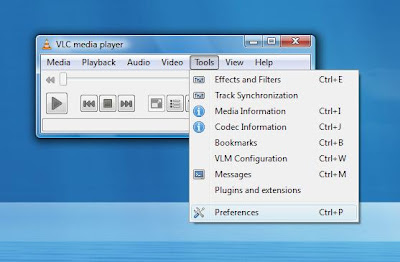
1) Launch VLC and click on the "Tools" menu and select "Preferences".
2) Once on the "Preferences" page select the "Audio" tab on the left hand side of the page.

3) Place a check mark next to "Enable audio" and "Use S/PDIF when available". For the "Force detection of Dolby Surround" setting choose Auto and under the "Output" section, choose "Win32 waveOut extension output" as output type. The rest of the settings are optional.
4) Restart VLC and your done.
1) Launch VLC and click on the "Tools" menu and select "Preferences".

2) Once on the "Preferences" page select the "Audio" tab on the left hand side of the page.

3) Place a check mark next to "Enable audio" and "Use S/PDIF when available". For the "Force detection of Dolby Surround" setting choose Auto and under the "Output" section, choose "Win32 waveOut extension output" as output type. The rest of the settings are optional.
4) Restart VLC and your done.
Comments
Post a Comment